
Developer Productivity Tools for GitHub: The 2026 Engineering Stack
In 2026, engineering velocity depends on validation rather than generation. Writing code is largely solved. Reviewing and merging it remains the primary friction point where developer productivity tools GitHub teams rely on often fail. You likely see this in growing pull request backlogs that stall delivery. Context switching between the IDE and GitHub UI degrades focus. Meanwhile, the June 2026 shift to usage-based AI credits makes scaling your stack a budgeting headache.
This guide identifies the high-impact tools you need to remove these specific bottlenecks. We'll help you build a modular stack designed to reduce code review cycle time and lower the overhead of manual quality checks. We cover everything from essential CLI integrations like version 2.96.0 to AI-powered code review automation that bypasses per-seat pricing models. You will learn how to implement a streamlined, automated workflow that prioritizes utility and cost-efficiency over expensive, monolithic platforms.
Key Takeaways
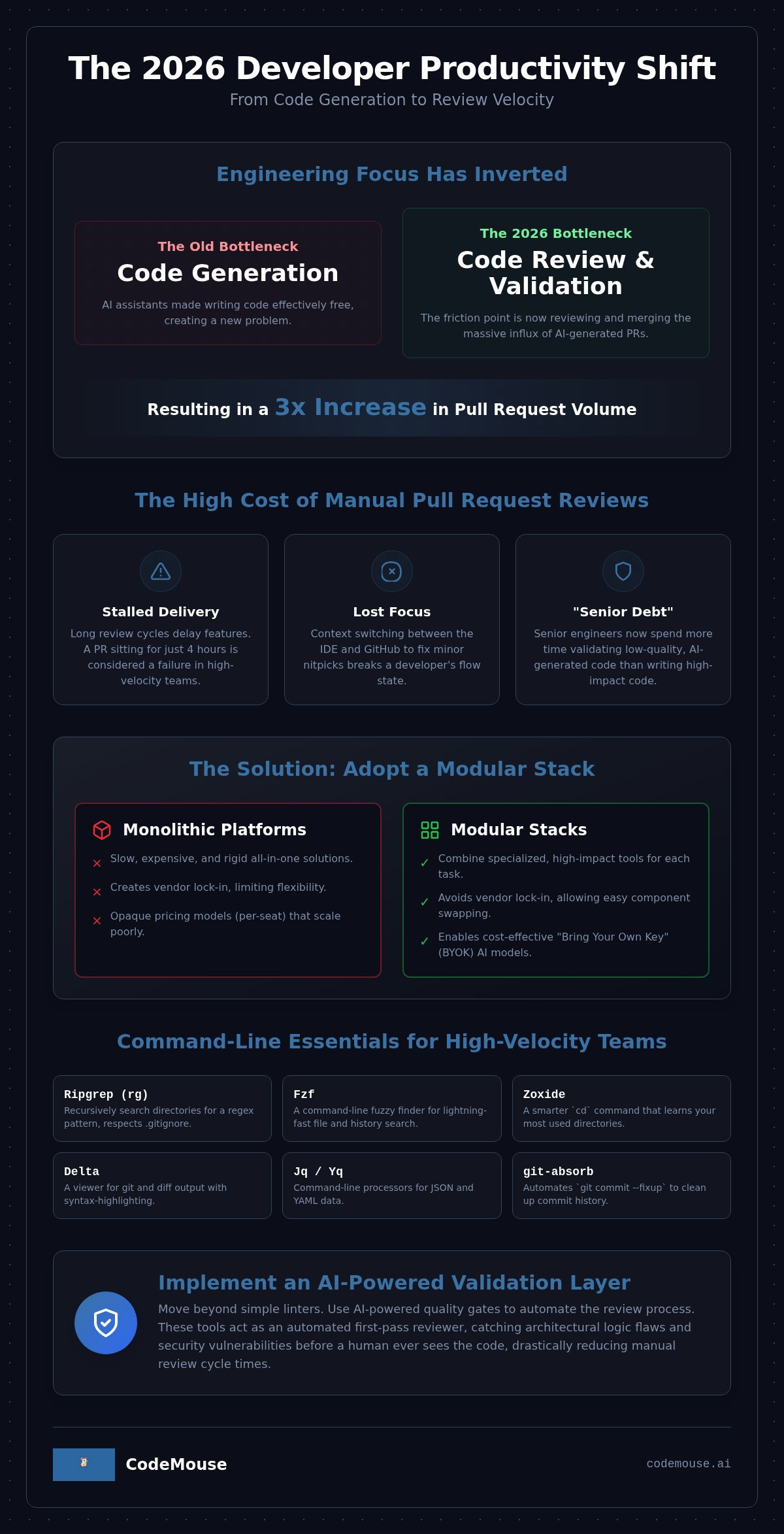
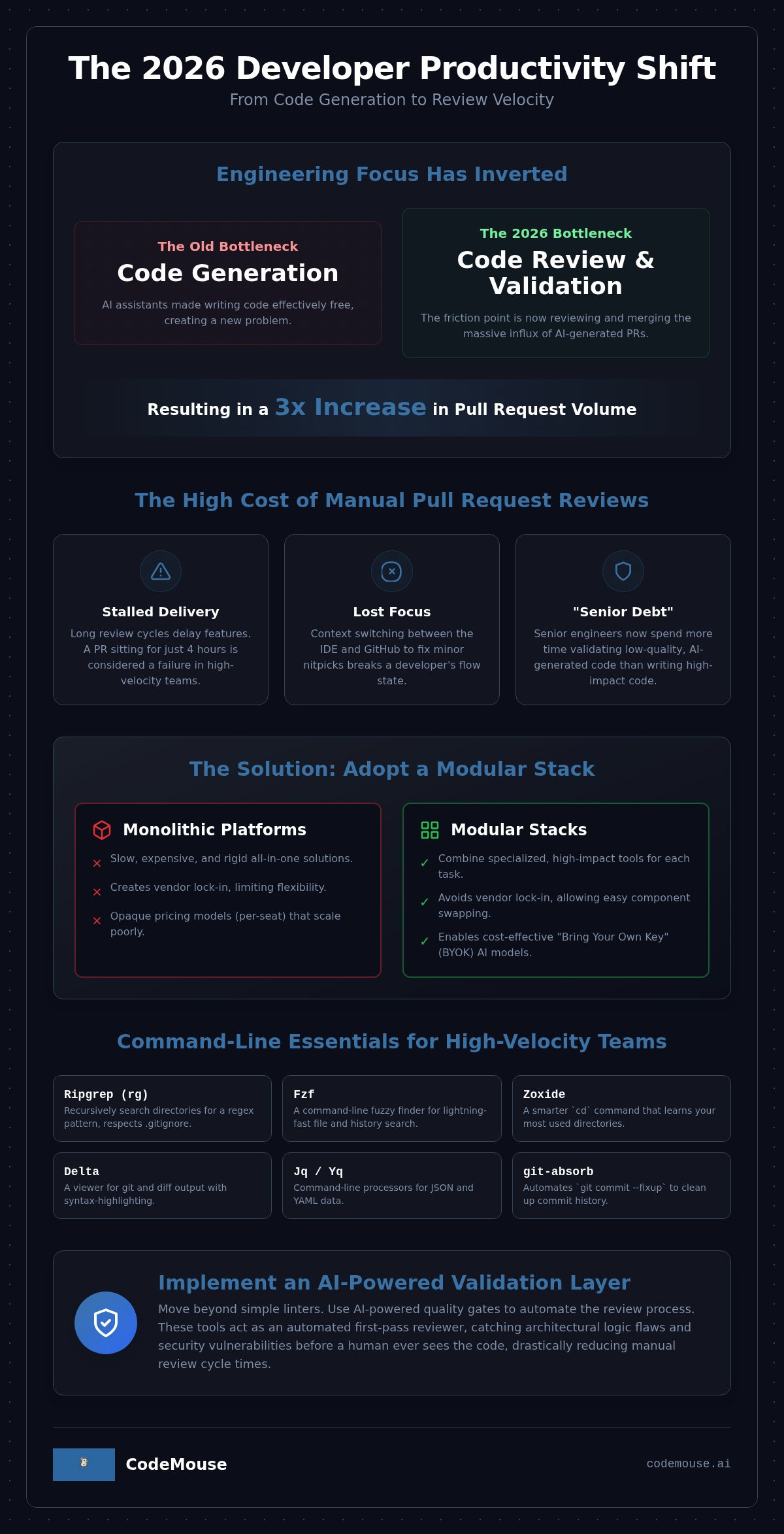
- Shift your engineering focus from code generation to review velocity to manage the 3x increase in pull request volume seen in 2026.
- Optimize your terminal with Ripgrep and Fzf to achieve near-instant codebase navigation and search.
- Select high-impact developer productivity tools GitHub that support agentic workflows, moving beyond simple autocomplete to automated multi-file refactoring.
- Implement AI-powered quality gates to automate the validation layer and drastically reduce manual code review cycle times.
- Build a modular productivity stack using flat-rate pricing models to avoid the scaling costs associated with traditional per-seat AI tools.
Table of Contents
The 2026 GitHub Productivity Landscape: From Generation to Validation
The engineering stack has fundamentally inverted. For years, tools focused on helping developers write code faster. Today, AI assistants have made code generation effectively free. This shift has created a massive influx of pull requests. Data from high-velocity teams, including companies like Shopify, shows a 33% increase in PRs per developer after adopting systematic tool support. The bottleneck is no longer the keyboard. It is the review process. When you flood a version control system with AI-generated code, you create "Senior Debt." Senior engineers now spend more time validating code than writing it. The most effective developer productivity tools GitHub teams deploy in 2026 prioritize review velocity over raw output.
Winning in this environment requires a move toward the "Modular Stack." Instead of relying on a single, monolithic platform that tries to do everything poorly, teams are combining specialized tools. This approach treats the development lifecycle as a series of discrete, optimizable steps: generation, navigation, and validation. By decoupling these layers, you avoid vendor lock-in and maintain better control over your internal logic and security protocols.
The New Bottleneck: Pull Request Cycle Time
Manual reviews are the primary cause of delivery delays. In high-velocity environments, a PR that sits for four hours is a failure. The cost isn't just the delay; it's the context switching. Developers lose flow state when they have to jump back into an old branch to fix a minor nitpick found by a human reviewer. Traditional static analysis and linters aren't enough anymore. They catch syntax errors but miss the architectural logic and security vulnerabilities common in AI-generated blocks. You need tools that act as an automated validation layer, filtering out low-level issues before a human ever looks at the code.
Why Modularity Wins Over All-in-One Platforms
Monolithic IDEs and all-in-one platforms are becoming technical liabilities. They are often slow, expensive, and rigid. The 2026 trend favors specialized GitHub Apps that do one thing with surgical precision. This modularity allows for "Bring Your Own Key" (BYOK) models. In a BYOK setup, you pay a flat fee for the tool's interface and workflow while paying your AI provider directly for usage. This provides total transparency into AI costs. It also ensures your data stays within your controlled environment, which is a critical requirement for modern compliance. Moving to a modular stack means you can swap out individual components as better models or tools emerge without rebuilding your entire workflow.
Command Line Essentials for GitHub Power Users
The terminal is the command center for any efficient engineer. In 2026, the best developer productivity tools GitHub users employ start with a high-performance shell. Efficiency at the command line directly impacts the "Activity" and "Flow" dimensions of the SPACE framework for productivity. Oh My Zsh remains the standard for plugin management; it handles the heavy lifting of shell configuration. Starship provides a fast, cross-shell prompt that surfaces Git status and environment context instantly. It's written in Rust and keeps the interface minimal and responsive.
Finding code is often faster than generating it. Ripgrep (rg) is the essential tool for traversing massive monorepos. It respects .gitignore by default and significantly outperforms legacy tools like grep or ack. You should pair it with Fzf for fuzzy finding across file names and command history. This combination eliminates the need to click through a GUI. Searching is faster than clicking. It keeps your hands on the home row and your mind on the logic.
Modern GitHub workflows rely heavily on YAML and JSON. Jq and Yq are non-negotiable for manipulating GitHub Action definitions or parsing API responses. For code clarity, Delta provides syntax-highlighting and side-by-side diffs directly in the terminal. When you need to clean up commits, git-absorb automates the fixup process. It identifies which commits are modified by your current changes and stages them for an interactive rebase. It's a surgical tool for maintaining a clean history.
Search and Discovery Tools
Search speed defines your navigation limits. Zoxide replaces the standard cd command with a smarter alternative that learns your most-visited directories. Typing a simple jump command like "z my-repo" moves you there instantly. Fd offers a faster, more intuitive syntax than the standard find command. It's built for speed and defaults to hidden-file exclusion, which mirrors how developers actually work. These tools reduce the cognitive load of file management.
Terminal Multiplexers and Multiplexing
Managing multiple repositories requires a persistent environment. Tmux is the classic choice for session management, but Zellij offers a modern interface with built-in layouts and a more accessible plugin system. These tools allow you to keep your workspace persistent across SSH sessions or local restarts. To further accelerate your workflow, create custom aliases for the GitHub CLI (gh). For instance, an alias for creating PRs with auto-filled metadata saves minutes per day. Once your PR is live, using an AI-powered code review tool ensures your changes move toward production without waiting for manual human intervention.
AI Coding Assistants: Accelerating the Writing Phase
Writing code in 2026 is no longer a manual syntax exercise. It's an orchestration of AI agents. The most effective developer productivity tools GitHub developers use have moved beyond simple autocomplete. They now operate with agentic workflows. This means the AI doesn't just suggest the next line; it performs multi-file refactoring and architectural updates across the entire repository. This capability depends on massive context windows. Modern assistants can "see" your entire codebase. This allows them to respect project-specific patterns and internal dependencies that older models missed.
Increased speed introduces new risks. AI-generated code can be technically correct but architecturally flawed. Hallucinations or insecure patterns are frequent enough to require a dedicated validation layer. While these tools accelerate the writing phase, they also increase the volume of code that must be reviewed. A 2026 analysis found that 71% of feedback from GitHub Copilot's code review feature was considered actionable. However, the sheer volume of suggestions can overwhelm standard workflows. This surge in output is what makes the post-push environment the actual bottleneck for modern teams.
IDE-Integrated Assistants
GitHub Copilot remains the standard for teams deeply embedded in the GitHub ecosystem. Its move to a usage-based "AI Credits" model in June 2026 changed how organizations budget for these tools. Copilot excels at native integration and security scanning. Conversely, Cursor has gained significant ground as a specialized fork of VS Code. It prioritizes a deep AI developer experience (DX) by making the LLM a first-class citizen of the editor rather than a plugin. For project-specific boilerplate, many teams now use custom LLM prompts to ensure the AI follows local style guides.
Command Line AI Agents
The terminal is also seeing an AI takeover. Claude Code allows developers to execute complex sequences of terminal commands using natural language. It can run tests, find patterns, and apply fixes autonomously. Aider serves as a CLI-based pair programmer that excels at rapid iterations. It handles the busy work of staging and committing AI-generated changes. Managing these automated commits requires strict git-undo patterns. This ensures that if an agent goes off the rails, you can revert the entire session with a single command.
The Validation Layer: Automating Reviews and Quality Gates
The volume of code being produced in 2026 has outpaced human capacity to review it. Manual intervention is now the primary friction point in the development lifecycle. It's the leading cause of reduced code review cycle time across modern engineering teams. When developers wait hours or days for a human to check their work, the momentum of the sprint dies. To solve this, high-performance teams are deploying a dedicated validation layer. This layer uses developer productivity tools GitHub integrations to provide instant, automated feedback before a human ever opens the pull request.
CodeMouse addresses this by implementing AI code quality gates for GitHub. Instead of relying on a single model's opinion, the system uses consensus analysis. By running Claude and GPT-4 simultaneously, it identifies edge cases that a single LLM might overlook. This multi-model approach significantly reduces false positives. It ensures that the feedback provided in automated PR comments is accurate, technical, and actionable. You get the speed of AI with the precision of a peer review.
AI-Powered Pull Request Reviews
CodeMouse AI provides context-aware feedback for every pull request by analyzing the diff against your existing codebase. It identifies logic errors and security gaps that traditional linters miss. This allows your senior engineers to stop acting as human syntax checkers. AI handles the style and low-level nitpicks. Human reviewers can then focus on high-level architecture and business logic. This shift drastically reduces "Reviewer Fatigue" in large organizations where PR volume has tripled due to AI code generation.
Continuous Inspection and Reliability
Reliability comes from automated enforcement. You can configure quality gates that block merges when the AI identifies high-risk issues. This prevents buggy or insecure code from ever reaching your main branch. The role of automated feedback also extends to team growth. Junior developers receive immediate corrections as they push code, which serves as a real-time training tool. By integrating these gates, you ensure that quality remains consistent regardless of team size or experience level. To start automating your validation layer, you can install CodeMouse AI Code Review as a native GitHub App today.
Building Your Modular Productivity Stack with CodeMouse
A "Pragmatic Stack" for 2026 avoids monolithic lock-in. It combines specialized developer productivity tools GitHub power users can configure for their specific needs. For startups and solo developers, this means choosing tools that scale without increasing per-user friction. The core of this stack is a fast terminal, a reliable coding assistant, and an automated validation layer. This configuration ensures that as your codebase grows, your review velocity stays high. You focus on the architecture while the tools handle the syntax and navigation.
Cost optimization is critical in the current market. Many AI tools have moved to complex credit systems or expensive per-seat pricing that punishes team growth. CodeMouse utilizes a flat-rate monthly fee regardless of team size. This model provides superior cost control. You maintain autonomy by using your own API keys for providers like Anthropic and OpenAI. This "Bring Your Own Key" (BYOK) approach ensures you only pay for the raw compute you use. It also keeps your data within your existing security boundaries. You aren't paying for "pro" tiers or bundled features you don't use.
Why CodeMouse Fits the 2026 Workflow
Efficiency requires zero-friction integration. CodeMouse installs as a native GitHub App. Setup is under two minutes. Once active, it provides unlimited reviews without throttling or "pro" tier limitations. You gain the benefit of multi-model consensus, leveraging the best of Anthropic and OpenAI without switching tools. It acts as a silent partner in your workflow. It handles the validation layer so you can focus on shipping features. There is no need for a total overhaul of your existing habits.
Actionable Implementation Strategy
Don't overhaul your entire workflow at once. Start by auditing your current pull request cycle time. Establish a baseline for how long code sits before a human review. Deploy CodeMouse on a single repository to evaluate the quality of the feedback. Monitor how many minor nitpicks are caught before they reach a senior engineer. Once the value is clear, scale the implementation across your organization. This methodical progression ensures immediate results with minimal risk. It allows your team to adapt to automated reviews at their own pace.
Automate your validation layer and remove the manual review bottleneck. Start your 14-day free trial with CodeMouse to measure the reduction in your code review cycle time today.
Ship Faster by Solving the Validation Bottleneck
The shift toward AI-assisted development has moved the engineering bottleneck from code generation to the review phase. To maintain high velocity in 2026, your stack must prioritize automated validation over raw output. By combining high-performance CLI utilities with specialized AI review agents, you create a workflow that scales without increasing senior overhead. This modular approach allows you to swap models and tools as the landscape evolves. It ensures you aren't locked into rigid, expensive platforms that punish growth.
Selecting the right developer productivity tools GitHub teams use is no longer about finding an all-in-one solution. It's about building a precise system that values your time and budget. Transitioning to a modular stack protects your margins and your engineering focus. The 2026 engineering landscape rewards teams that automate the mundane and focus on architectural integrity.
Automate your GitHub reviews for a flat monthly fee with CodeMouse. It supports Claude 3.5 and GPT-4o, uses a "Bring Your Own Key" model to keep costs transparent, and offers a 14-day free trial. Start building your modern engineering stack today.
Frequently Asked Questions
What are the best developer productivity tools for GitHub in 2026?
The most effective stack in 2026 combines high-performance CLI tools with specialized AI agents. Foundationally, you need Ripgrep and Fzf for rapid codebase navigation. For the writing phase, Cursor and Claude Code are the current leaders. To solve the review bottleneck, developer productivity tools GitHub power users rely on include CodeMouse for automated validation and quality enforcement.
How do AI code review tools improve developer productivity?
AI review tools provide instantaneous feedback on every pull request. They identify syntax errors, security vulnerabilities, and logic flaws before a human reviewer even opens the PR. This filters out minor nitpicks and reduces the cognitive load on senior engineers. By automating the first pass of validation, teams can merge code faster and keep developers in a state of flow.
Can I use multiple AI models like Claude and GPT for code reviews?
Yes. CodeMouse supports multi-model consensus by utilizing both Claude and GPT models. This approach is superior to relying on a single LLM because it identifies edge cases that one model might miss. Using multiple models increases the accuracy of feedback and significantly reduces false positives in your automated review process.
What is the most cost-effective way to implement AI code reviews for a team?
A flat-rate subscription model is the most cost-effective choice for growing teams. Traditional per-seat pricing becomes prohibitively expensive as you scale. By choosing a tool with a flat monthly fee and a "Bring Your Own Key" model, you only pay for the interface and your actual API usage. This prevents the cost spikes associated with usage-based AI credits in monolithic platforms.
Do automated PR review tools replace human reviewers?
Automated tools augment human reviewers rather than replacing them. AI handles the repetitive, low-level tasks like checking for style consistency and common bugs. This allows human engineers to focus their time on high-level architecture and complex business logic. The goal is to remove the "Senior Debt" created by manual review backlogs.
How does CodeMouse handle data privacy and codebase security?
CodeMouse integrates as a native GitHub App and uses your own API keys for model processing. This setup ensures you maintain direct control over your data. Because you use your own provider accounts, your code is not used to train the underlying models. It provides a secure validation layer that respects the privacy requirements of modern engineering organizations.
What is the 'Bring Your Own API Key' model in developer tools?
The BYOK model allows you to connect your existing AI provider accounts to a productivity tool. You pay the tool provider a flat fee for the workflow and pay the AI provider directly for your usage. This provides total transparency into your AI spend. It also allows you to benefit from the latest model updates from Anthropic or OpenAI immediately.
How can I reduce my pull request cycle time using GitHub apps?
You can reduce cycle time by installing developer productivity tools GitHub teams use to automate quality gates. These apps trigger reviews the moment a push occurs. This eliminates the idle time between a developer finishing their work and receiving the first round of feedback. Faster feedback loops lead to quicker iterations and a more predictable delivery schedule.