Codacy vs CodeMouse: Comparing AI Code Review for GitHub in 2026
The most expensive tool in your stack isn't the one with the highest invoice. It's the one that stalls pull requests with noisy feedback and manual bottlenecks. Choosing between Codacy vs CodeMouse means deciding between a heavy enterprise compliance engine and a lean, AI-native review partner. Both aim to improve code quality. They take different paths to the merge button.
You likely already know the frustration of paying over $20 per developer only to have static analysis tools flag hundreds of non-critical style issues. It's a standard friction point for engineering teams in 2026. Manual reviews remain a bottleneck. Per-seat pricing models make scaling expensive. Tools should provide utility, not just noise.
This guide breaks down the trade-offs between Codacy’s traditional static analysis and CodeMouse’s multi-model AI logic. You'll learn how to lower your monthly spend, increase the signal-to-noise ratio in your PR comments, and achieve faster merge times. We'll compare pricing structures, integration depth, and how to get context-aware feedback without the enterprise overhead. By the end, you'll know which tool fits your workflow and budget.
Key Takeaways
- Contrast static linter patterns with semantic LLM reasoning to identify deeper logic flaws that traditional tools miss.
- Compare the long-term ROI of Codacy vs CodeMouse by analyzing per-user fees against a flat-rate pricing model.
- Learn how multi-model consensus logic filters out noise and reduces AI hallucinations during pull request reviews.
- Assess the integration effort between manual coding standard configurations and a two-minute GitHub App installation.
- Match your team's needs to the right tool, whether you prioritize enterprise compliance dashboards or lean, context-aware feedback.
Table of Contents
Static Analysis vs. AI Reasoning: The Architectural Divide
The core tension in Codacy vs CodeMouse lies in how they interpret code. One follows a predefined map. The other reads the terrain. Understanding the difference between static patterns and semantic reasoning is the first step in optimizing your review pipeline.
Codacy's Legacy: Linters and Security Scans
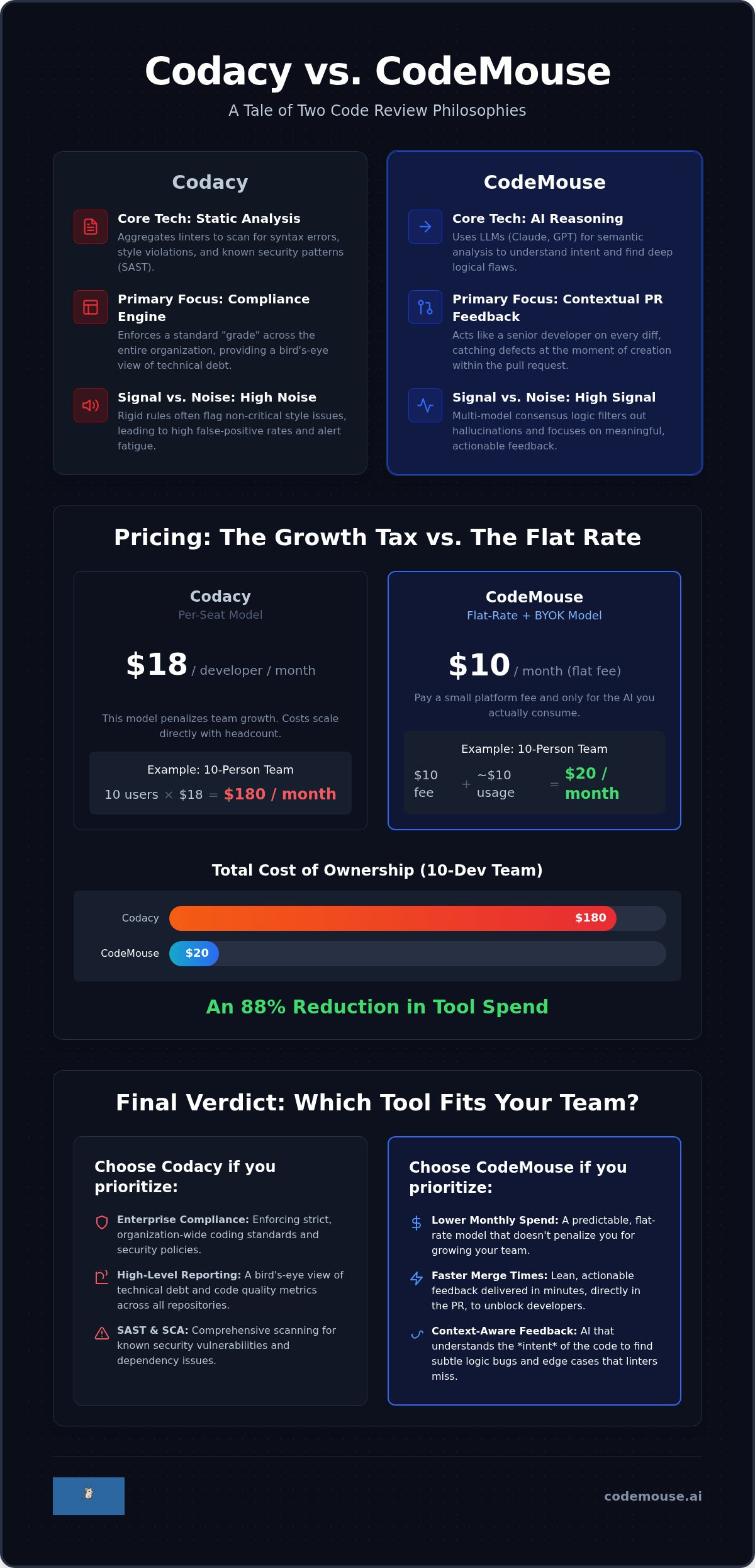
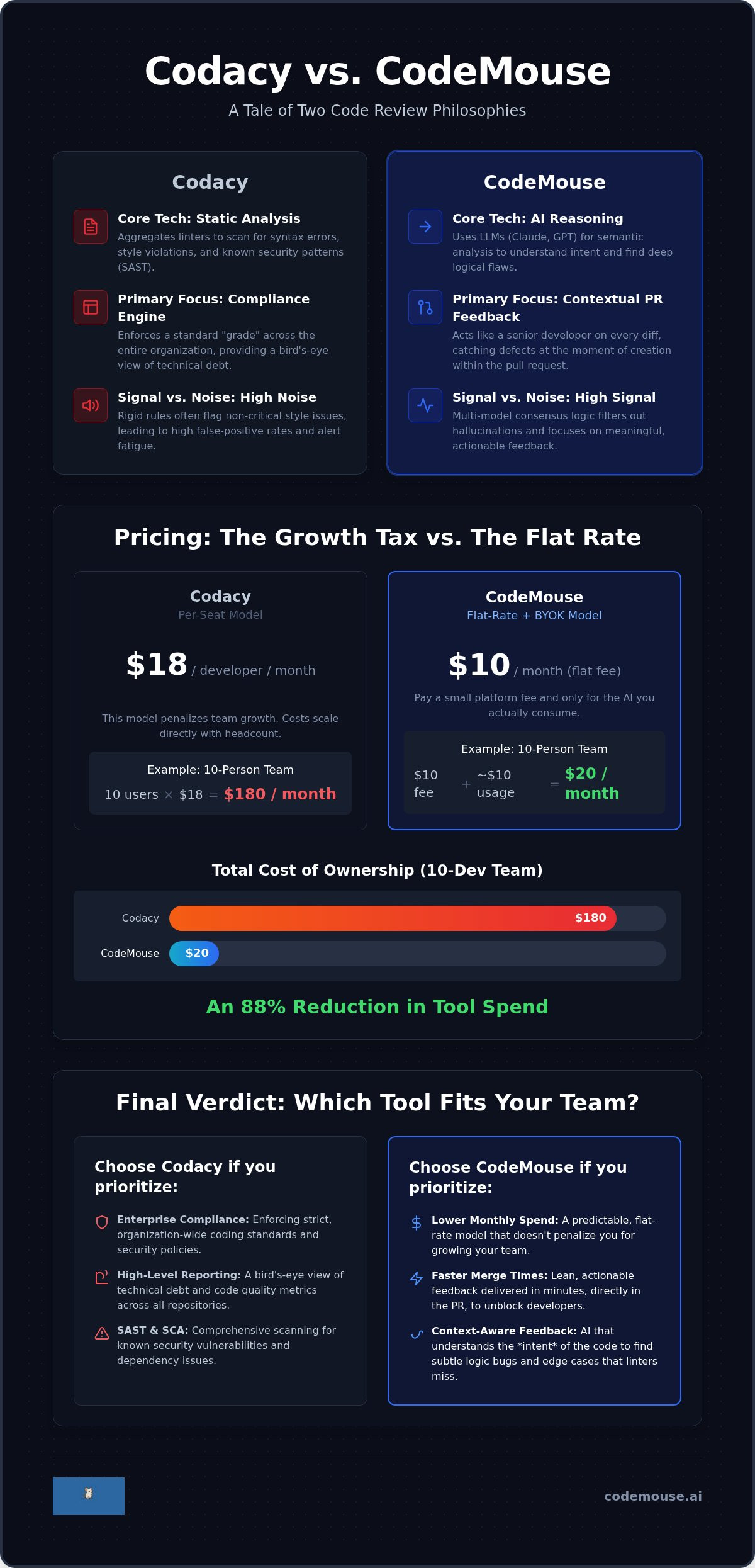
Codacy is built on a foundation of Static program analysis. It aggregates dozens of open-source and proprietary linters to scan for syntax errors, style violations, and known security patterns. It excels at SAST (Static Application Security Testing) and SCA (Software Composition Analysis). For engineering managers, this provides a bird's-eye view of technical debt across the entire organization. It's a compliance engine designed to enforce a standard "grade" across thousands of files.
However, this breadth comes with a trade-off. Static rules are rigid. They often flag "issues" that aren't actually bugs, leading to high false-positive rates. When a tool generates 200 warnings for a single file based on naming conventions, developers start to ignore the output. It becomes background noise that slows down the merge process rather than speeding it up.
CodeMouse's Approach: Contextual PR Feedback
CodeMouse shifts the focus from the entire codebase to the specific changes in a pull request. Instead of checking code against a list of static rules, it uses Large Language Models (LLMs) like Claude and GPT to perform semantic analysis. It doesn't just look for a missing semicolon. It understands intent. It can spot a logical flaw in an if statement or an edge case in a database query that a linter would never catch. It's like having a senior developer review every diff.
This approach prioritizes immediate action over long-term reporting. By integrating as a GitHub App, CodeMouse provides feedback loops within minutes of a push. It catches defects at the moment of creation. You don't have to wait for a weekly debt report to realize a PR introduced a race condition. It's a lean workflow that keeps the focus on the current task.
Choosing between Codacy vs CodeMouse depends on where you want the friction. Codacy adds friction at the compliance level, ensuring every repo hits a specific organizational standard. CodeMouse adds value at the PR level, helping engineers ship better logic without the overhead of noisy linting reports.
Pricing Comparison: Per-Seat Tax vs. $10 Flat Rate
The financial impact of Codacy vs CodeMouse becomes obvious as your engineering team expands. Most DevOps tools use per-seat pricing. This acts as a growth tax. Every time you hire a new developer or bring on a contractor, your monthly invoice increases. Codacy's Team plan currently costs $18 per developer per month when billed annually. For a 10-person team, that is a baseline of $180 every month. If you scale to 25 developers, you are looking at $450 per month just for static analysis and basic AI guardrails.
The Hidden Costs of Scaling
Per-seat pricing does more than just drain your budget. It creates friction in the onboarding process. Engineering leads often hesitate to add junior developers or temporary contributors to the tool to avoid triggering a higher billing tier. This gates quality control behind a paywall. Codacy’s enterprise tiers add further complexity with custom pricing and negotiation cycles. In 2026, managing tool sprawl requires budget predictability. You need a tool that scales with your repository volume, not your headcount.
The BYO API Key Advantage
CodeMouse operates on a "Bring Your Own Key" (BYOK) model. You pay a flat $10 monthly fee for the orchestration platform. You then connect your own Anthropic or OpenAI API keys. This approach provides total transparency. There are no hidden markups on AI tokens; you pay the AI providers directly for exactly what you consume. Recent research on LLMs for code review highlights how this direct integration allows for more sophisticated, agentic workflows without the premium overhead of traditional SaaS platforms. You maintain full control over model usage limits and security configurations.
Calculating the Total Cost of Ownership (TCO) reveals the disparity. For a 10-person team:
- Codacy: $180 per month (Annual billing).
- CodeMouse: $10 per month + AI usage fees.
Feature Showdown: Catching Logic Bugs with AI Consensus
The architectural difference between Codacy vs CodeMouse dictates the type of bugs you'll catch. Codacy is primarily a governance tool. It uses a library of static patterns to enforce "guardrails" across your repositories. This ensures every file meets a baseline for security and style. CodeMouse is a reasoning tool. It uses Large Language Models to perform a semantic "sanity check" on every pull request. One tool checks if the code looks right; the other checks if the code works right.
Multi-Model Consensus: CodeMouse's Secret Sauce
Large Language Models are powerful but imperfect. They can hallucinate or get stuck on irrelevant details. CodeMouse mitigates this by using a multi-model consensus logic. It sends your code diff to both Claude (Anthropic) and GPT (OpenAI) simultaneously. The tool then compares the outputs. If both models flag a potential memory leak or an insecure API call, the confidence score is high. If only one model suggests a minor variable rename, the noise is filtered out before it reaches your PR comments.
This consensus model catches subtle logic bugs that static analysis tools simply miss. A linter knows if you've used an unsafe function. It doesn't know if your business logic will fail when a specific user input is null. By utilizing a hybrid AI-symbolic reasoning approach, CodeMouse provides feedback that mimics a human peer. It understands the context of the change within the larger repository. This reduces the manual effort required for the initial review pass. You automate the mechanical "sanity check" so your team can focus on high-level architecture.
Enterprise Compliance vs. Developer Velocity
The choice between Codacy vs CodeMouse often comes down to who the tool is for. Codacy is a powerful asset for engineering managers and security teams. It provides the dashboards and evidence required for SOC2 compliance. It tracks technical debt trends over months. If your primary goal is organizational oversight and security reporting, Codacy is the standard choice. It acts as the official record of code quality for the CISO.
CodeMouse prioritizes the person writing the code. It's designed to streamline the PR cycle and increase developer velocity. It doesn't demand a complex setup of coding standards across dozens of repos. You install the GitHub App, and it starts providing value immediately. This is especially effective for AI code review for small teams where overhead is the enemy. It provides the necessary infrastructure for quality checks without the enterprise-grade friction. You get context-aware reviews that help you merge faster while keeping your tool stack lean.
Integration and Workflow: GitHub Native Experience
The integration experience of Codacy vs CodeMouse highlights a fundamental shift in how tools enter the development cycle. Codacy follows a traditional enterprise path. You must configure coding standards, select which linters to run, and define quality gates for each repository. It's a configuration-heavy process that often requires administrative oversight. CodeMouse adopts a zero-config philosophy. You install the GitHub App, provide your API key, and the reviews begin. There is no manual mapping of rules or pattern selection required to get started.
GitHub App Simplicity
Modern engineering teams prioritize tools that stay out of the way. CodeMouse lives entirely within the GitHub PR interface. Feedback appears as native comments directly on the diff. You don't need to toggle between a separate dashboard and your code to understand a suggestion. This is a core component of GitHub PR automation tools that focus on reducing context switching. The setup time is measured in minutes. It integrates into your existing habits rather than demanding a total overhaul of your workflow.
Legacy static analysis engines often suffer from processing lag. When you push code, the engine must run its entire library of patterns, which can throttle the PR cycle during peak hours. CodeMouse relies on high-speed LLM inference. This "No-Throttling" approach ensures that feedback arrives while the code is still fresh in the developer's mind. Speed is a functional requirement for high-velocity teams. If the feedback isn't immediate, it's ignored.
Developer Experience (DX) Comparison
Noise is the primary reason developers mute automated tools. Static analysis linters frequently flag low-value style issues like trailing whitespace or indentation. This buries critical feedback under a mountain of trivia. CodeMouse uses its multi-model consensus to prioritize actionability. It ignores the fluff and focuses on logic, intent, and potential runtime errors.
When CodeMouse identifies an issue, it provides a threaded comment with a suggested fix. You can apply the change directly within GitHub. This is a significant leap forward in catching bugs in pull requests. Instead of just identifying a problem, the tool provides the solution. You spend less time debating style and more time shipping features. If you're ready to stop managing linters and start reviewing logic, you can install CodeMouse AI in under two minutes.
Final Verdict: Which Tool Should You Choose?
Choosing between Codacy vs CodeMouse is an exercise in resource allocation. You're deciding where your engineering team's friction belongs. If your primary objective is satisfying a security audit or maintaining a "Grade A" codebase across 500 legacy repositories, Codacy provides the necessary oversight. If your goal is shipping logical code today without a per-user tax, CodeMouse is the pragmatic choice. Both tools improve quality; they just prioritize different stages of the development lifecycle.
When to Stick with Codacy
Large enterprises with strict security auditing requirements find value in Codacy’s broader suite. It handles more than just code quality. It provides DAST (Dynamic Application Security Testing) and license violation scanning. These are essential for organizations that need to prove compliance to external stakeholders. If your business values high-level managerial reporting and historical debt trends over the speed of an individual PR, stay with the platform approach. It acts as a centralized dashboard for the CISO to monitor risk across the entire SDLC.
Why Startups and Solo Devs Pivot to CodeMouse
Lean teams often find enterprise platforms too heavy for their daily needs. The budget-friendly $10 flat rate for unlimited repositories removes the financial barrier to entry. You don't have to worry about adding a temporary contractor or a junior intern to your tool stack. Beyond cost, the superior bug detection offered by Claude and GPT models provides a higher signal-to-noise ratio. You get senior-level feedback on logic flaws rather than a list of 50 missing semicolons. The architecture is lean. It doesn't bloat the developer workflow with unnecessary configuration screens.
Some teams find success using both. They use Codacy for monthly security scans and license compliance while using CodeMouse for real-time PR reviews. This allows you to maintain enterprise-grade governance while giving developers the fast, context-aware feedback they need to merge code. It ensures that security remains a background process while developer velocity stays at the forefront. This hybrid approach leverages the specific strengths of each tool without compromising on either compliance or speed.
Deciding on a tool shouldn't require a long sales cycle. You can test the multi-model consensus logic on your own repositories today. Start a 14-day free trial with CodeMouse to see how it handles your specific logic challenges. Connect your API key, install the GitHub App, and receive your first review in under two minutes.
Modernizing Your Pull Request Workflow
The choice in Codacy vs CodeMouse comes down to your primary bottleneck. If your organization requires deep security auditing and codebase-wide technical debt reporting, Codacy remains a standard enterprise choice. However, if your team is bogged down by noisy linters and high per-user costs, it's time to shift to a more surgical approach. CodeMouse replaces rigid static rules with semantic AI reasoning. This ensures you catch logic bugs that traditional patterns often miss.
You can now automate the "sanity check" phase of every pull request without the enterprise overhead. By leveraging a multi-model consensus of Claude and GPT, you get high-signal feedback directly in your GitHub diffs. This verified GitHub App eliminates per-seat taxes in favor of a predictable flat rate. You keep control of your AI usage and your budget simultaneously. It's about providing utility to the developer rather than just reporting for management.
Efficiency in 2026 is about reducing friction, not adding more dashboards. You can start your 14-day free trial of CodeMouse today to experience flat $10/month pricing and context-aware reviews. It's a pragmatic step toward faster merge times and cleaner production code. Give your team the senior-level feedback they need to ship with confidence.
Frequently Asked Questions
Does CodeMouse support security scanning like Codacy?
CodeMouse focuses on semantic logic and PR-level feedback rather than the broad security scanning suites found in Codacy. While Codacy provides SAST and SCA tools to identify known vulnerabilities and license violations, CodeMouse uses LLMs to catch logical flaws and edge cases. It's a tool for code quality and intent rather than a dedicated security compliance engine.
Can I use CodeMouse with my own Claude or OpenAI API keys?
Yes, CodeMouse uses a "Bring Your Own Key" model. You connect your own Anthropic or OpenAI accounts to power the reviews. This provides transparency in AI costs and ensures you only pay for what you use. It also gives you control over which models are used for consensus logic during the review process.
Is there a free trial for CodeMouse?
Yes, you can start a 14-day free trial to test the integration on your own repositories. This allows you to evaluate the quality of the AI feedback before committing to the flat monthly fee. Setup takes under two minutes via the GitHub App. You'll see immediate results on your next pull request.
How does CodeMouse pricing compare to Codacy for a team of 10?
Comparing Codacy vs CodeMouse for a 10-person team reveals a significant cost gap. Codacy typically costs around $180 per month for a team of this size on an annual plan. CodeMouse charges a flat $10 monthly fee regardless of team size. You pay for AI usage directly to your provider, which usually averages between $0.05 and $0.15 per review.
Does CodeMouse work with GitLab or Bitbucket?
No, CodeMouse currently integrates exclusively with GitHub via a dedicated GitHub App. Codacy supports GitHub, GitLab, and Bitbucket Cloud. If your team operates on a multi-platform stack or requires on-premise deployment for Bitbucket Server, Codacy is the appropriate choice. CodeMouse is built for teams looking for a lean, GitHub-native experience.
Will AI code review replace my senior developers?
No, AI code review is designed to augment senior developers, not replace them. It handles the initial "sanity check" by catching logical errors and edge cases. This allows your senior engineers to focus on high-level architectural decisions and business requirements. It automates the mechanical parts of the review to reduce cycle times.
How do I handle AI hallucinations in code reviews?
CodeMouse minimizes hallucinations by using multi-model consensus logic. By sending the same code diff to both Claude and GPT, it filters out noise and low-confidence suggestions. If the models disagree, the tool can suppress the comment. This creates a higher signal-to-noise ratio in the Codacy vs CodeMouse comparison for PR-level feedback.
Can I configure custom rules in CodeMouse?
CodeMouse follows a zero-config philosophy and does not require manual rule configuration. It relies on the LLM's understanding of the codebase context and general best practices. If you need to enforce specific, rigid organizational coding standards or linting rules across hundreds of repos, Codacy’s configuration-heavy approach is better suited for those requirements.