How to Automate Code Reviews for Engineering Teams (2026)
Senior developers shouldn't spend four hours a day checking for syntax errors or missing docstrings. It's an expensive waste of their talent and your engineering budget. You know the frustration of pull requests sitting idle for days while reviewers struggle with fatigue. Feedback is often inconsistent, and senior engineers are burning out from acting as human linters. By 2026, manual-only review processes have become a primary bottleneck for high-velocity teams.
Learning how to automate code reviews is no longer a luxury; it's a requirement for maintaining a competitive deployment frequency. You need a system that works while you sleep. This guide outlines a multi-layered automation strategy designed to eliminate manual bottlenecks. You'll learn how to build a pipeline that handles everything from basic static analysis to intelligent, context-aware semantic reviews. We'll show you how to standardize code quality across every PR and reclaim time for deep architectural work. It's time to move beyond simple linting and implement a strategy that actually lowers engineering overhead.
Key Takeaways
- Identify and eliminate the "Review Tax" by automating repetitive syntax and style checks that drain senior engineering time.
- Learn how to automate code reviews through a three-tier strategy ranging from basic linting to advanced semantic analysis.
- Configure your CI/CD pipeline to act as the first line of defense, ensuring only high-quality, pre-validated code reaches human reviewers.
- Leverage AI models like Claude and GPT to detect complex logic flaws that traditional static analysis tools often miss.
- Scale your review process efficiently using a flat-rate, native GitHub integration that prioritizes cost control and model flexibility.
Table of Contents
Why Manual Code Reviews Are Failing Your Sprint Velocity
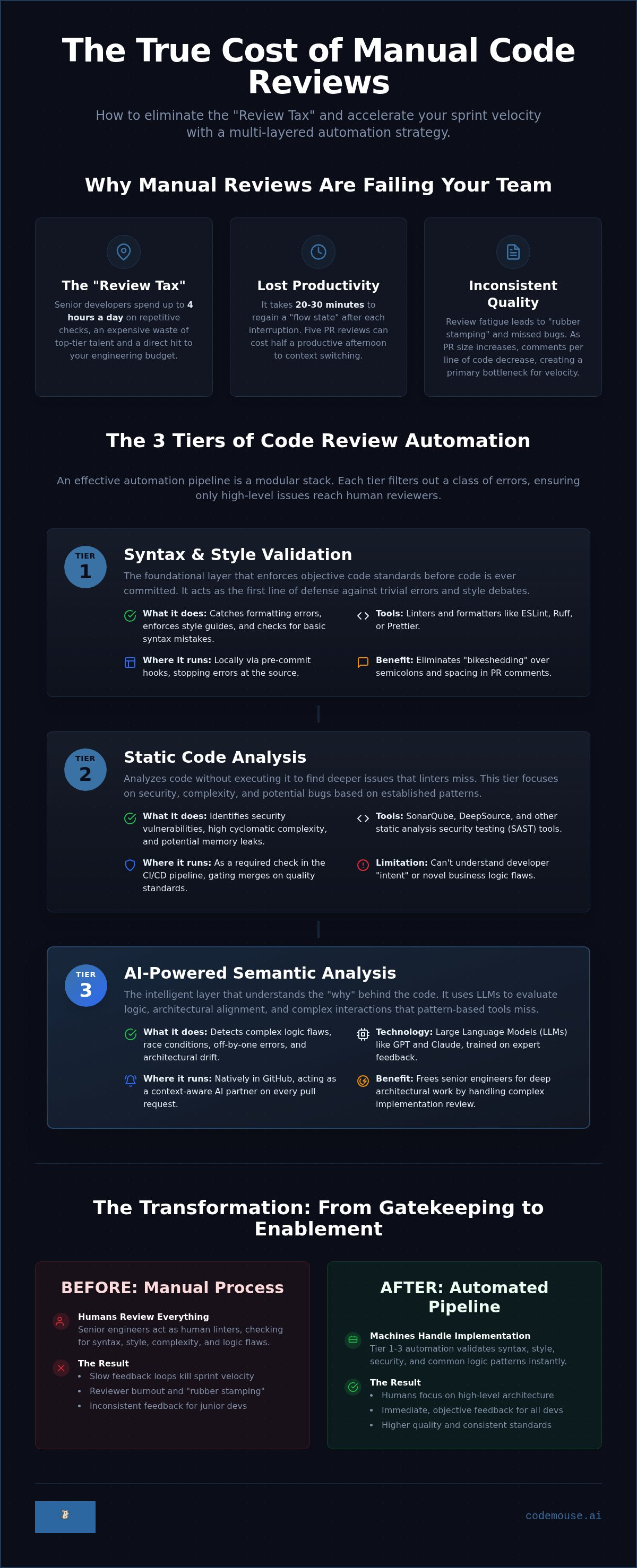
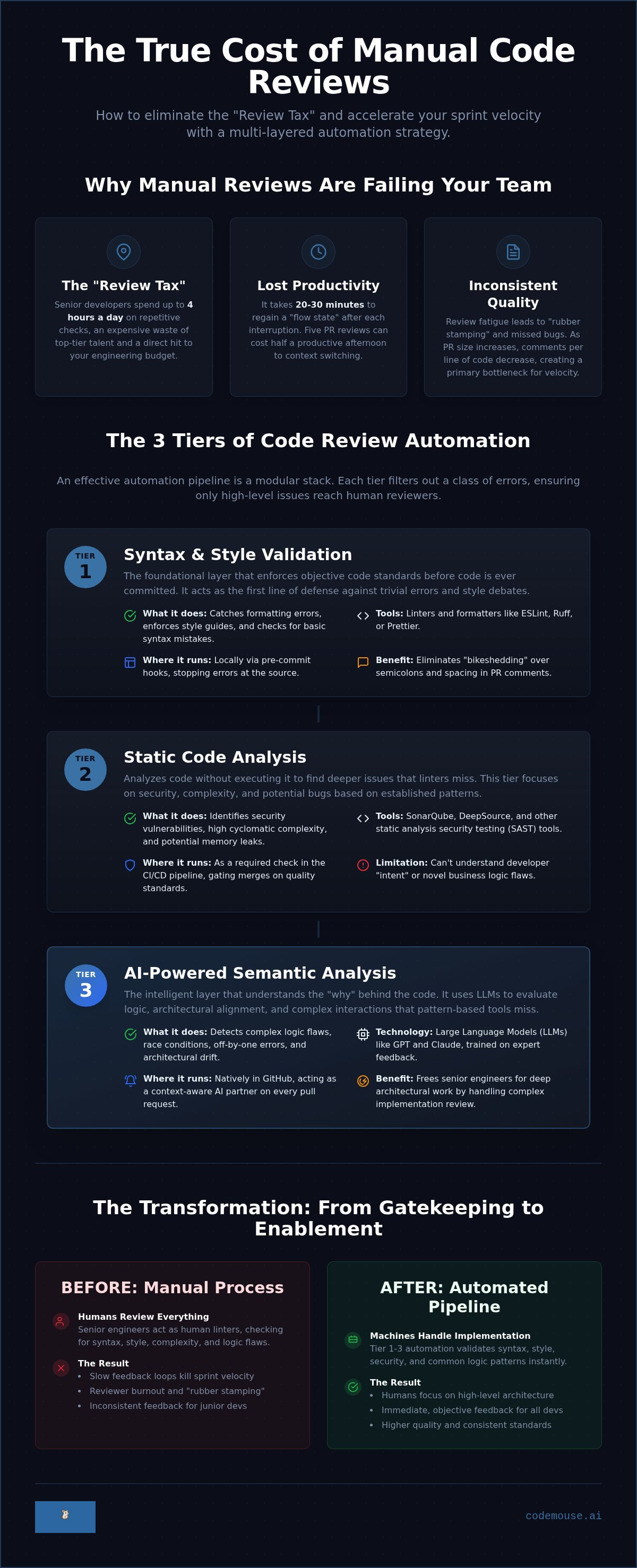
Senior developers are your most expensive resource. Every time they stop coding to review a pull request, you pay the "Review Tax." This isn't just the time spent reading code. It's the 20 to 30 minutes required to regain a deep "flow state" after the interruption. Manual reviews create a fragmented workday. By the time a senior dev clears a queue of five PRs, they've lost half their productive afternoon to context switching. The cost of this lost focus is often higher than the value of the review itself.
When PR queues grow, quality inevitably drops. This leads to "rubber stamping." Reviewers click "Approve" without deep scrutiny just to clear the backlog. It's a natural human response to fatigue. In 2026, engineering standards demand feedback loops that operate in seconds. Humans cannot maintain peak attention across hundreds of lines of diffs every day. Implementing an automated code review system is the only way to scale. It prevents your senior talent from drowning in repetitive tasks and burning out from review fatigue.
The Bottleneck Effect in Modern CI/CD
Continuous deployment pipelines are only as fast as their slowest manual step. Often, that step is the PR approval. Large pull requests are particularly dangerous. Data shows that as PR size increases, the number of comments per line of code decreases. People stop looking for bugs and start looking for the exit. This "idle time" is the gap between a developer pushing code and receiving feedback. It's the primary killer of sprint velocity. Teams often ask how to automate code reviews to fix this specific lag and keep the deployment train moving.
Moving Toward a 'Review-Less' Culture
The goal isn't to remove humans from the process entirely. It's to reallocate them. Machines should handle the implementation details: syntax, style, and common logic patterns. Humans should focus on high-level architecture and business logic. This shift creates a safer environment for junior developers. They receive immediate, objective feedback from a machine rather than waiting for a subjective human response. Transitioning to this model is the first step in learning how to automate code reviews effectively. It moves the team from gatekeeping to automated enablement. You build a culture where "LGTM" actually means something because the machine has already validated the foundation.
The Three Tiers of Code Review Automation
Effective automation isn't a single tool. It's a hierarchy. To understand how to automate code reviews, you must view the process as a modular stack. Each layer serves a specific purpose, filtering out noise before it reaches a human. A balanced stack uses three distinct tiers to ensure that by the time a senior engineer sees a pull request, the implementation is already verified. This tiered approach prevents simple mistakes from cluttering the discussion and wasting expensive development cycles.
Tier 1 & 2: The Foundation of Clean Code
The first two tiers focus on objective standards. Tier 1 covers syntax and style using linters and formatters like ESLint, Ruff, or Prettier. These tools should run locally via pre-commit hooks. This catches errors before they even reach GitHub. It stops "bikeshedding" about semicolons or trailing spaces in the PR comments. Tier 2 introduces static analysis. Tools like SonarQube or DeepSource analyze code without executing it. They identify security vulnerabilities, high cyclomatic complexity, and potential memory leaks. These tools are excellent at finding patterns, but they are fundamentally limited. They lack "intent." A linter can tell you that a variable is unused, but it cannot tell you if your discount logic is mathematically flawed.
Tier 3: The AI Revolution in PR Analysis
Tier 3 is where semantic analysis happens. This layer uses automated code review powered by Large Language Models (LLMs) to understand the "why" behind the code. Unlike traditional regex-based tools, these systems evaluate logic and architectural alignment. Modern AI models trained on expert feedback can now identify race conditions, off-by-one errors, and architectural drift. They act as a context-aware partner in your GitHub workflow. They don't just find mistakes; they understand how a change in the authentication module might impact the session handler. This is the final, intelligent layer in the automation stack.
A functional pipeline requires all three tiers working in unison. Tier 1 and 2 handle the "how" of the code, while Tier 3 handles the "what" and "why." If you're looking to implement this final layer without complex per-seat pricing, consider integrating CodeMouse into your existing GitHub environment. It provides the semantic depth needed to finally move humans away from implementation checks and back toward high-level architecture.
Step-by-Step: Implementing an Automated Review Pipeline
Building a review pipeline requires a methodical approach. Don't automate a broken process. Start by auditing your last 50 pull requests. Identify recurring bugs, style violations, and the specific files that generate the most discussion. This data tells you exactly what to automate first. Once you have a baseline, you can begin the technical implementation. The goal is a hands-off system that validates code quality before any human notification is sent.
Your CI/CD environment is the engine of this pipeline. Whether you use GitHub Actions or CircleCI, the triggers remain the same. Execute your linters and static analysis tools on every push. Only after these passes should you trigger the semantic layer. An industrial case study on AI code review highlights how this multi-stage approach reduces pull request turnaround times by filtering out noise early. Finally, define "Auto-Approve" criteria. Documentation updates or minor dependency bumps shouldn't require a senior engineer's signature. Automating these low-risk changes keeps the queue moving.
Configuring GitHub Actions for Review Automation
Start by creating a workflow file in .github/workflows/. Use the pull_request trigger with opened, synchronize, and reopened types. This ensures the automation runs whenever code changes. Manage your secrets carefully. Store your AI provider keys in GitHub Actions Secrets to keep them out of your source code. Once the workflow is stable, update your branch protection rules. Require these automated checks to pass before a PR can be merged. This creates a hard gate that maintains code standards without manual intervention.
Integrating AI Agents into the Workflow
Choosing the right integration method is critical when learning how to automate code reviews at scale. Self-hosted scripts offer total control but require high maintenance. GitHub Apps provide a more streamlined experience. They handle the API rate limits and UI integration for you. When prompting an AI agent, feed it your specific team standards. Tell it to focus on your internal naming conventions or specific security patterns. Using dedicated GitHub PR automation tools simplifies this process. These tools manage the context of your entire repository, ensuring the feedback is relevant to your specific codebase rather than just generic suggestions. This is how to automate code reviews while maintaining the high-level oversight your project requires.
Beyond Linting: Using AI for Semantic Pull Request Analysis
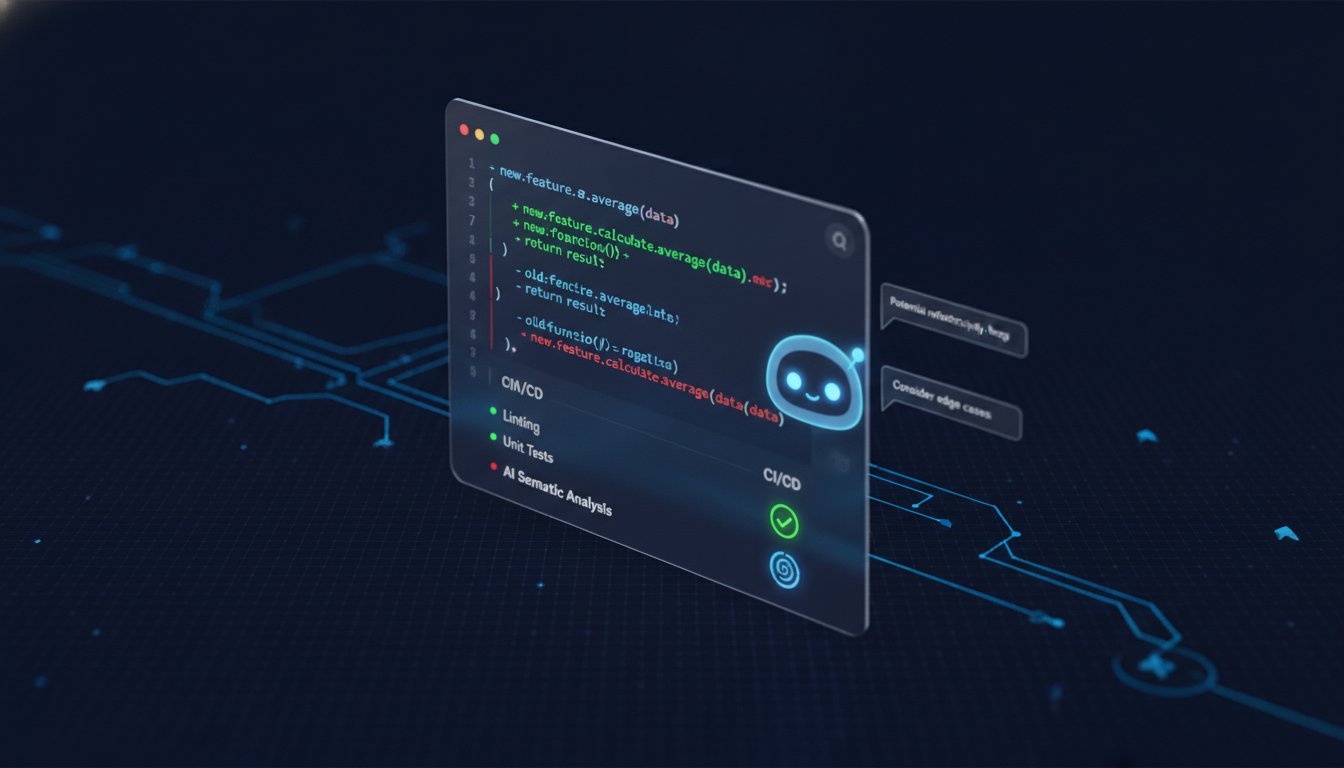
Traditional static analysis tools are blind to intent. A regex-based linter can find a missing bracket or an unused variable, but it cannot identify a flawed discount calculation. It doesn't understand that your new authentication logic accidentally bypasses the session handler. Semantic analysis bridges this gap by evaluating the "why" behind the code. This is where you truly learn how to automate code reviews at a senior level. LLMs analyze the relationship between your changes and the existing codebase, identifying logic flaws that traditional tools miss.
Noise is the primary enemy of developer adoption. If an automated tool leaves twenty irrelevant comments on a PR, developers will stop reading them. High-relevance feedback requires sophisticated filtering. This is especially critical in fast-moving environments where AI code review for startups acts as a safeguard against senior debt. By catching architectural drift early, you prevent the accumulation of legacy-style bugs in a modern stack. Semantic review is a context-aware check of logic intent.
Multi-Model Consensus Logic
Relying on a single AI model can lead to hallucinations or missed edge cases. Cross-verification through multi-model consensus is the industry standard for 2026. CodeMouse leverages both Claude and GPT to analyze every pull request. The system uses a "Consensus" approach: it typically only flags issues where both models agree on the logic flaw. This drastically reduces false positives. It ensures that when a developer receives a notification, it's worth their attention. Cross-verification provides a level of accuracy that single-model scripts cannot match. Install CodeMouse to implement this multi-model consensus in your workflow today.
Handling AI Feedback in the Team
Automation is a tool for enablement, not just gatekeeping. Establish a clear protocol for how developers should interact with AI comments. We recommend a simple 'Agree/Disagree' reaction system. If a developer disagrees with a suggestion, they should provide a brief reason. This feedback loop helps refine the team's understanding of how to automate code reviews effectively. For junior developers, these automated comments serve as a 24/7 teaching tool. They receive immediate explanations of complex logic errors without waiting for a senior's time. This accelerates onboarding and maintains a high quality bar across the entire engineering organization.
Scaling Quality with CodeMouse: The Future of PR Automation
CodeMouse is a native GitHub App designed for engineering teams that value autonomy and efficiency. It serves as the final, intelligent layer in your automation stack. By integrating directly into your pull request workflow, it provides the semantic depth required to replace manual implementation checks. This is the most direct answer to how to automate code reviews without introducing unnecessary friction or high overhead. It moves your team away from the "gatekeeper" model and toward a system of continuous, automated enablement.
The "Bring Your Own Key" (BYOK) model is a core differentiator. Unlike traditional SaaS tools that bundle AI costs with high markups, CodeMouse allows you to use your own OpenAI or Anthropic API keys. This ensures you pay the raw provider rates without the "per-seat tax" common in enterprise software. You maintain total control over model selection and costs. For a flat $10 per month, you get unlimited repositories and team members. This transparency is essential for growing teams that need to scale their quality control without unpredictable monthly bills. It positions CodeMouse as a silent partner that enhances your existing workflow rather than demanding a total overhaul of your habits.
CodeMouse Setup in 60 Seconds
Installation is a linear, three-step process. First, install the app from the GitHub Marketplace and select the repositories you want to monitor. Second, input your API keys for Claude or GPT in the dashboard. Third, customize your review depth. You can toggle between exhaustive logic checks or high-level architectural summaries. The tool respects your configuration immediately. There's no complex onboarding or long-winded training period. It's a functional tool built for technically literate professionals who need immediate results. You can adjust the feedback style to match your team's internal documentation standards, ensuring the AI's tone remains professional and peer-to-peer.
Maximizing ROI on Automated Reviews
To calculate the value of your automation, track the reduction in "idle time" between a push and a review. Measure the hours saved per developer per week by eliminating repetitive syntax and style comments. Integrating CodeMouse into your AI code review for GitHub strategy ensures that senior developers only see code that has already passed a semantic validation. This reclaims hours of deep work every week. By 2026, the cost of manual-only reviews has become a primary bottleneck. Automation isn't just about catching bugs; it's about building a scalable infrastructure for your engineering talent.
The best way to evaluate the impact on your specific codebase is through direct implementation. Start your 14-day free trial of CodeMouse to see how it handles your specific logic patterns. This trial allows you to test the multi-model consensus and the BYOK model with no upfront commitment. It is the practical next step for teams looking for how to automate code reviews with surgical precision and minimal overhead.
Reclaiming Engineering Velocity through Automation
Manual bottlenecks are the primary threat to modern sprint velocity. By implementing a multi-layered strategy, you've learned how to automate code reviews from basic linting to advanced semantic analysis. This transition allows your senior engineers to focus on high-level architecture while machines handle the implementation details. You now have the framework to build a pipeline that catches logic flaws through multi-model consensus and ensures standardized quality across every pull request. Standardizing these checks keeps your codebase clean without the psychological burden of review fatigue.
Scaling this infrastructure shouldn't come with a per-user pricing model that penalizes your growth. CodeMouse provides a native GitHub integration that leverages models like Claude 3.5 and GPT-4o to deliver context-aware feedback on every commit. You maintain full control over your AI costs through the pragmatic "Bring Your Own Key" model. For a flat fee, you can run unlimited reviews across your entire organization without worrying about usage tiers. Automate your GitHub PRs with CodeMouse for $10/month and start reclaiming your team's deep work cycles today. Building a faster, safer development lifecycle starts with removing the manual gatekeepers.
Frequently Asked Questions
Can automated code reviews completely replace human reviewers?
No, automation is a filtering tool rather than a total replacement. It handles implementation details like syntax, style, and common logic patterns so humans can focus on high-level architecture and business logic. This tiered approach is the standard for how to automate code reviews effectively. Humans remain essential for verifying that code meets complex business requirements and architectural standards.
Is it safe to give an AI tool access to my private GitHub repositories?
Security depends on the integration architecture. CodeMouse operates as a native GitHub App using granular permissions and doesn't store your source code. By utilizing a "Bring Your Own Key" model, you maintain direct control over the data flow between GitHub and your AI provider. This setup ensures that your proprietary logic stays within your managed environment and approved AI infrastructure.
How much does it cost to automate code reviews using AI?
Total cost includes a subscription fee and raw model usage. CodeMouse charges a flat $10 per month for unlimited repositories and team members. You pay your AI provider directly for the tokens used. Research indicates a typical review costs between $0.05 and $0.15. This model eliminates the "per-seat tax" found in traditional enterprise software subscriptions.
What is the difference between static analysis and AI code review?
Static analysis uses rigid, rule-based patterns to find syntax errors or known security vulnerabilities. It lacks context. AI code review uses Large Language Models to understand semantic intent. It can identify logic flaws, race conditions, and architectural drift that traditional regex-based tools cannot see. AI functions as an intelligent reviewer rather than a simple pattern matcher.
Does CodeMouse support languages like Python, TypeScript, and Go?
Yes, it supports all major programming languages understood by modern LLMs. This includes Python, TypeScript, Go, Rust, Java, and C++. Because the system leverages models like Claude 3.5 and GPT-4o, it adapts to your specific language syntax and ecosystem conventions automatically. You don't need language-specific plugins to get started with semantic analysis.
How do I prevent an AI review bot from spamming my pull requests?
Use high-confidence thresholds and multi-model consensus logic. CodeMouse allows you to filter suggestions so only issues verified by both Claude and GPT reach the developer. This prevents notification fatigue by eliminating low-relevance comments. You can also customize the review depth to ensure the bot only flags critical logic flaws rather than every minor stylistic preference.
What happens if the AI suggests a fix that is actually incorrect?
Developers should treat AI feedback as a peer suggestion rather than a mandate. If a suggestion is incorrect, the developer can simply dismiss or ignore the comment. These interactions serve as a feedback loop to help the team refine how to automate code reviews. Over time, the team learns which files or logic patterns require more human oversight versus automated trust.
Can I use my own Claude or GPT API keys with automation tools?
Yes, CodeMouse utilizes a "Bring Your Own Key" (BYOK) model. You provide your own API keys from Anthropic or OpenAI. This approach ensures total transparency over your AI usage and prevents the markups common in bundled services. It also gives you the flexibility to switch between different models as they are updated without changing your review infrastructure.